Reminder schedules: time, distance and rides
How time-based, distance-based and activity-based reminders count down, and how to combine them.
A reminder can come due by date, by distance ridden, by number of rides, or any mix of the three. You set the rules under Reminder Schedule when you create or edit a reminder.
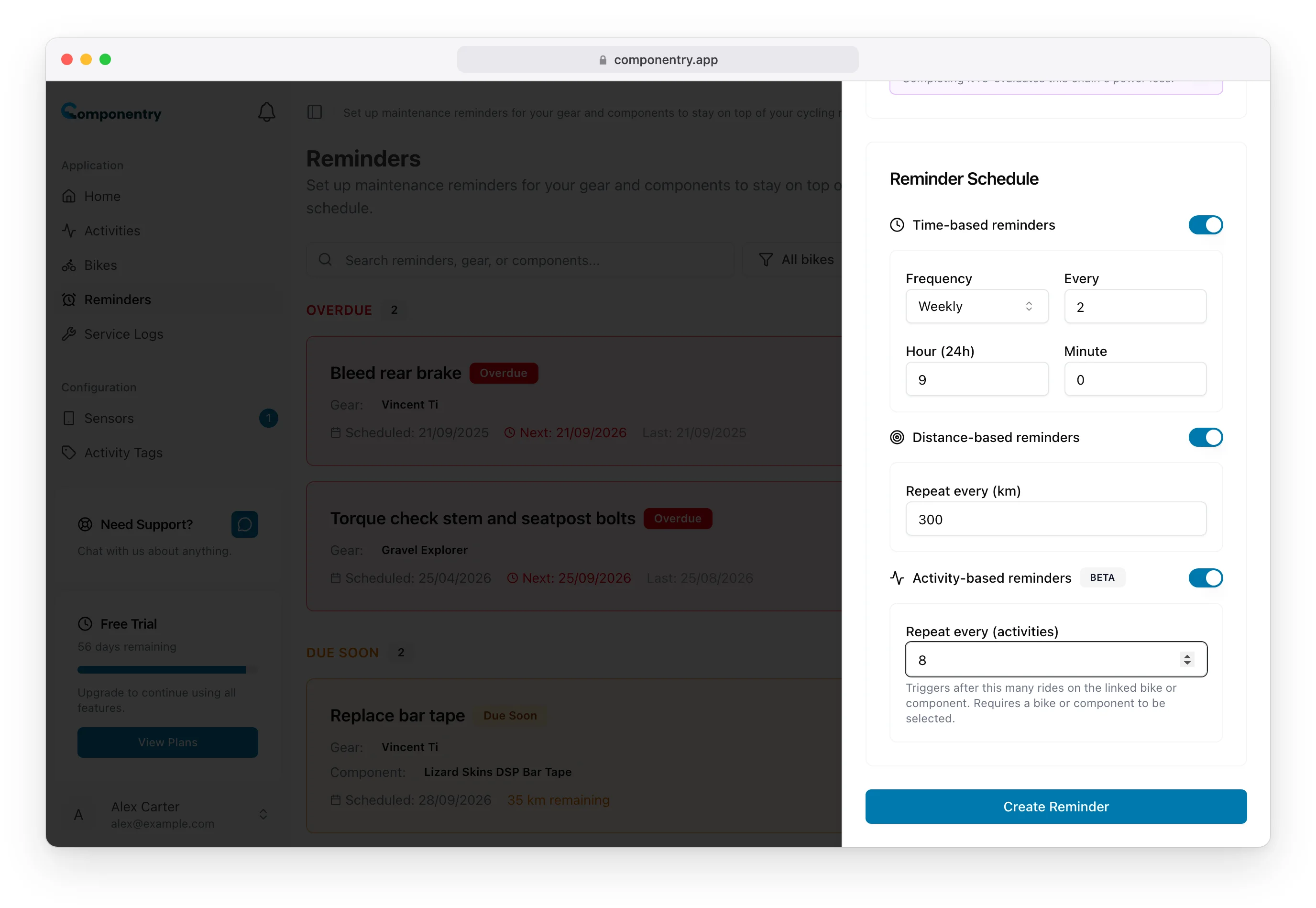
Time-Based Reminders
Pick a Frequency of Daily, Weekly or Monthly, and how many of those to count with Every:
| You want | Frequency | Every |
|---|---|---|
| Every two weeks | Weekly | 2 |
| Every three months | Monthly | 3 |
| Once a year | Monthly | 12 |
Hour (24h) and Minute set the time of day it falls due, 9:00 by default. The first due date is the Start Date.
Suits jobs that age with time whether or not you ride: tubeless sealant, suspension and brake servicing, a bolt check, insurance renewal.
Distance-Based Reminders
Enter how far between each one in Repeat every, in your own distance unit: the label shows it, for example Repeat every (km) or Repeat every (mi). The reminder then shows the distance left in the same unit.
If you ride in miles and set up or edited a distance reminder on the web before the end of September 2026, the number you typed was saved as kilometres. Open Reminder Details and check its Distance Interval; edit the reminder if the figure is wrong.
Distance is counted on what the reminder belongs to:
- A component: that part's own distance, so a reminder on a new tyre starts from the tyre's distance, not the bike's.
- A bike: the bike's total distance ridden.
- Nothing: there is no distance to count, so give it a bike or component if you want a distance rule.
The reminder shows how much is left, for example "35 km remaining", and becomes due when that reaches zero. Distance goes up as your rides are processed, so a distance reminder moves after each synced ride.
Suits wear from riding: chain checks, bar tape, brake pads, tyres.
Activity-Based Reminders (Beta)
Enter how many rides between each one in Repeat every (activities). Each ride processed on the linked bike or component adds one, and the reminder shows progress such as "4 / 6 activities". Activity-based reminders need a bike or component.
Suits jobs you do after a set number of rides regardless of their length, like waxing a chain.
Combining Rules
Switch on more than one rule and the reminder comes due on whichever is reached first. "Every 300 km or every 2 weeks" catches both a big week of riding and a quiet one. Its place on the Reminders page follows the most urgent rule.
What Happens After You Complete One
Completing a reminder starts every rule again from that moment:
- Time: the next one falls a full interval from the day you complete it, at the hour you set. Finish early or late and the schedule moves with you.
- Distance: the next one is the full distance from where the part or bike is now.
- Rides: the count goes back to zero.
See Completing Reminders.
One-Off Jobs
Every reminder repeats; there is no one-time option. For a job you only need to do once, complete it when it's done and then delete it.