• Plans
  • Blog
  • FAQs
  • Help
Sign InSign Up
  • Getting started with Componentry
  • Bikes
    • Adding a bike
    • Purchase and receipts
    • Distance ridden
    • Insurance
    • Bike settings
  • Components
    • Setting Up a Bike with a Template
    • Adding Components
    • Editing and Removing Components
    • Tire Pressure
    • Chains: Wax, Lube and Stretch
  • Activities
    • Connecting apps
    • Uploading FIT files
    • Editing activities
    • Pairing a ride with Strava
  • Sensors
    • Auto-matching Rides to Bikes
    • Pairing a Sensor with a Bike
    • Setting Your Bike on Strava Automatically
  • Profiles
    • Creating and Managing Profiles
    • Assigning Components to Profiles
    • Profiles and Activities
  • Reminders
    • Creating Reminders
    • Reminder schedules: time, distance and rides
    • Finding, Editing and Deleting Reminders
    • Reminders on bikes and components
    • Completing Reminders
  • Service Logs
    • Creating a Service Log
    • Maintenance Checks
    • Retiring and Replacing Components
    • Completing Reminders from Service Logs
    • Emailing a Service Report
  • Predictions
    • Unlocking Predictions
    • Personalised Wear Predictions
    • Wear Factors
    • Race-Day Readiness
    • Chain Power Loss
  • Bike Fit Measurements
    • Using Bike Fit Measurements
  • Activity Tags
    • Creating Activity Tags
    • Editing and Deleting Activity Tags
    • Hiding Activity Tags
  • Notifications
    • Notification Types
    • Managing Notification Preferences
    • Troubleshooting Notifications
  • AI Assistants
    • Connecting Claude
    • Privacy and Permissions
  • Account settings
    • Units and locale
    • Billing and free trial

Creating Reminders

Create a maintenance reminder for a bike or a component, and choose when it comes due.

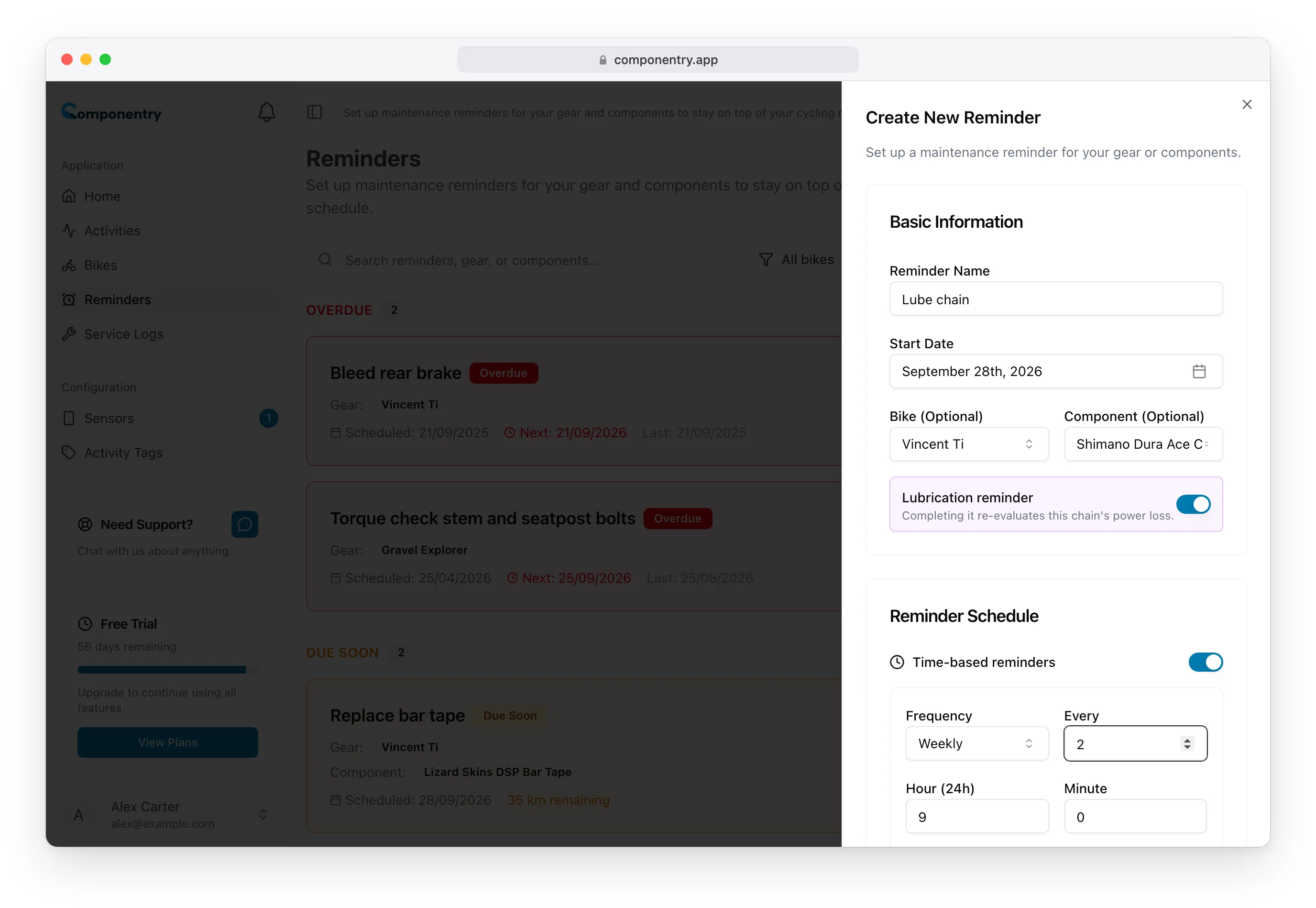
Create reminders from the Reminders page. Every reminder needs a name and at least one rule for when it comes due.

Create a Reminder

  1. Open Reminders in the sidebar and select Create Reminder.
  2. Enter a Reminder Name that says what to do, such as "Check tubeless sealant" or "Bleed rear brake".
  3. Set the Start Date. For a time-based reminder this is the day it first comes due.
  4. Choose a Bike (Optional), and if the job is for one part, a Component (Optional) on that bike. See Reminders on bikes and components for how this choice changes the reminder.
  5. If you picked a chain, you can switch on Lubrication reminder for a lube or wax job.
  6. Under Reminder Schedule, switch on the rules you want and fill them in:
    • Time-based reminders: a Frequency (Daily, Weekly or Monthly), how many to count (Every), and the Hour (24h) and Minute it falls due.
    • Distance-based reminders: how far between each one.
    • Activity-based reminders: how many rides between each one.
  7. Select Create Reminder.

The Create New Reminder sheet with a Lube chain reminder on Vincent Ti's chain, Lubrication reminder switched on and a weekly schedule

Time-based reminders are switched on by default. Switch them off if you only want the distance or ride rule. At least one rule has to be on before you can save.

A new reminder starts in Scheduled and moves up the list as it gets closer to due. See Reminder schedules for how each rule counts.

Reminders That Are Set Up for You

When you add a component. Many component types come with standard reminders, such as "Check chain wear" and "Lube/Wax chain" for a chain or "Check brake pad wear" for brake pads. The add-component form shows a preview and a checkbox to create them. The bike setup wizard has a matching Auto-create reminders for components that have presets option. Each one is named after the part, for example "Chain: Check chain wear", and you can edit or delete it like any other reminder.

When you record insurance. Adding an insurance policy to a bike sets a reminder for the number of days before renewal you choose, repeating every year. See Bikes.

Tips

  • Name the job, not the part. The bike and component already show on the reminder.
  • One job per reminder. "Service suspension fork" and "Check tubeless sealant" are easier to tick off separately.
  • For a job you only need to do once, create the reminder and delete it after you've done it. Every reminder repeats.
  • You can also create reminders in the mobile app, or ask an AI assistant to do it.

Know your bike, down to the individual component. Unlock more from your bike to keep it running at peak performance.

© Copyright 2026 Componentry. All Rights Reserved.
Download on the App StoreGet it on Google Play
About
  • Features
  • Predictions
  • Integrations
  • Service history
  • Reminders
  • Bikes
  • AI assistants
  • Plans
  • FAQs
  • Blog
  • Contact
Product
  • Help
  • Changelog
Resources
  • Tire pressure calculator
Compare
  • All comparisons
  • vs ProBikeGarage
  • vs Strava
  • vs Geer
  • vs WatchMy.Bike
  • vs Velo Buddy
  • vs MainTrack
  • vs Bikerly
Legal
  • Terms of Service
  • Acceptable Use Policy
  • Privacy Policy
  • Cookie Policy
Connect
  • @componentry.app
  • @componentry
  • @componentry
  • r/componentry
  • @componentry.app