• Features
  • Plans
  • Blog
  • FAQs
  • Help
Sign InSign Up
  • Getting started with Componentry
  • Activity Tags
    • Creating Activity Tags
    • Editing and Deleting Activity Tags
    • Hiding Activity Tags
  • Devices
    • Linking a Device to Gear
    • Linking a Device to a Strava Bike
  • Reminders
    • Creating Reminders
    • Time & Duration Reminders
    • Editing & Deleting Reminders
    • Assigning Reminders to Gear & Components
    • Completing Reminders
  • Profiles
    • Creating and Managing Profiles
    • Assigning Components to Profiles
    • Profiles and Activities
  • Service Logs
    • Creating a Service Log for Gear
    • Retiring and Adding Components with Service Log Links
    • Creating and Emailing Service Reports
  • Notifications
    • Notification Types
    • Managing Notification Preferences
    • Troubleshooting Notifications
  • Bike Fit Measurements
    • Using Bike Fit Measurements
  • Predictions
    • Unlocking Predictions
    • Personalised Wear Predictions
    • Wear Factors
    • Race-Day Readiness

Wear Factors

Understand the 'What's driving wear' breakdown and what each factor means for your components.

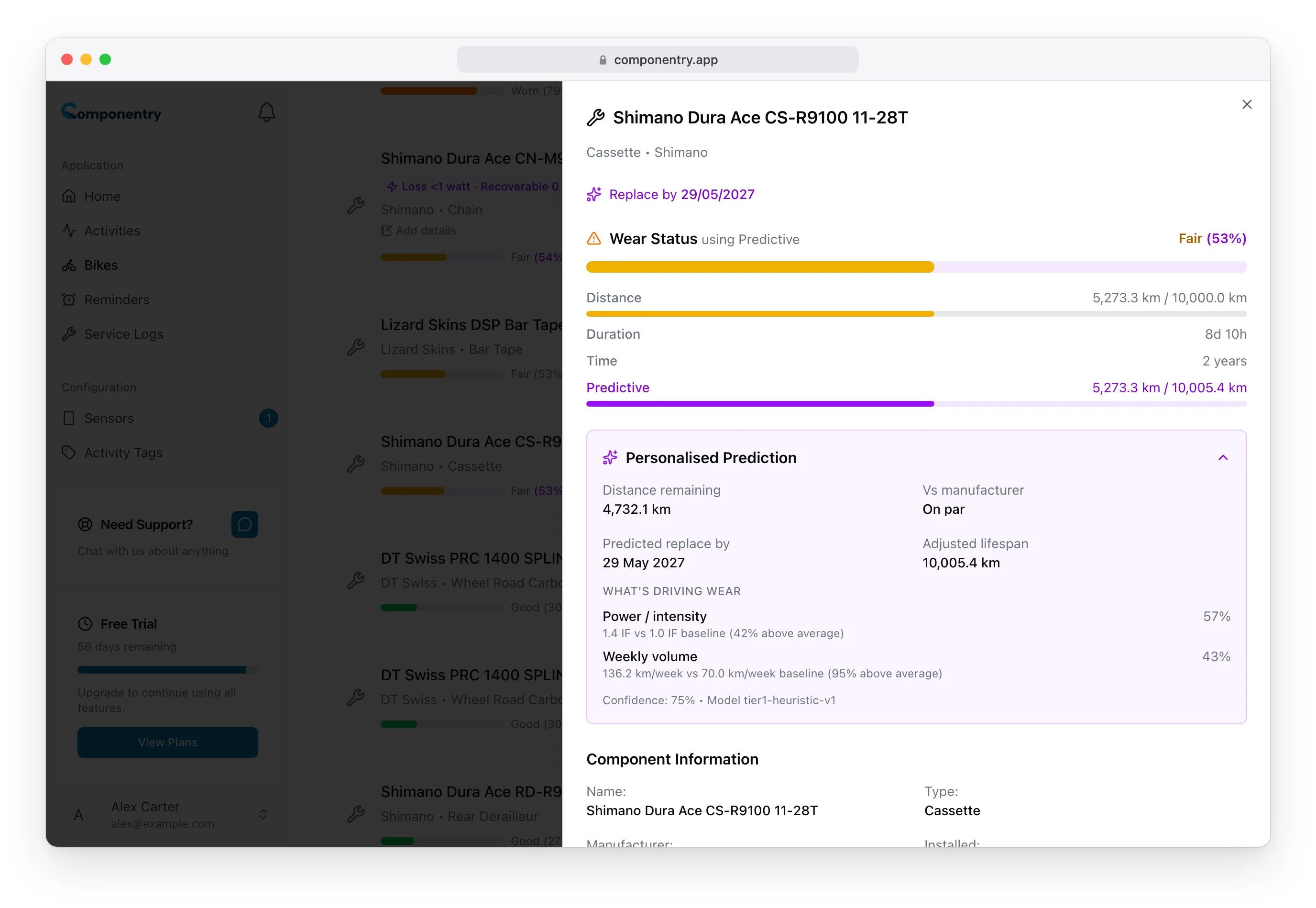
Every personalised prediction comes with a What's driving wear breakdown: a short list of factors, each with a percentage, explaining why that component is wearing at the rate Componentry is projecting. This page covers what each factor means, how to read the numbers, and how to act on them.

Where to Find It

Open a component with a personalised prediction. Below the prediction numbers, you'll see What's driving wear followed by a ranked list of factors — the largest driver first.

[Screenshot placeholder: "What's driving wear" card showing factors with percentages and short descriptions]

How to Read a Factor

Each factor has three parts:

  • Label — a short name like Heavy climbing load or Wet conditions.
  • Impact percentage — how much this factor is contributing to the projected wear rate for this component. The list is sorted largest first.
  • Detail — a one-line explanation with context specific to you (for example, "18m/km terrain score vs 10m/km population average").

The percentages are relative contributions to accelerated wear for this particular component, not probabilities or confidence scores. A 30% impact means this factor is responsible for roughly 30% of why the prediction differs from a generic manufacturer lifespan.

The Factors

Different components are sensitive to different things, so which factors show up varies by component type. The most common ones:

Climbing

How much you climb relative to the distance you ride. Steep, sustained climbing increases stress across the drivetrain, raises power output, and — on long descents paired with climbs — adds wear to brakes.

Descending

Descent volume is the dominant factor for brake pad and rotor wear. Long, repeated descents also cycle heat through disc brakes, which affects pad life.

Power

If you ride with a power meter, your average effort relative to your own baseline is a major factor. Higher sustained power means more drivetrain stress per kilometre — especially under load on climbs.

Weather

Wet, cold, and gritty conditions accelerate wear on chains, cassettes, cables, and brake pads. This factor comes from the actual weather at your ride location and time, not a generic climate assumption.

Mileage / Volume

How much you ride in a typical week compared to an average rider. A high-volume rider will obviously wear things faster, and this factor captures that.

Terrain

A broader measure of how rough your rides are — elevation gain, surface variety, and how often you're out of the saddle. Relevant for components where ride profile matters more than pure distance.

[Screenshot placeholder: Example factor list for a chain showing climbing, weather, power, and mileage contributions]

Why Your Factors Differ Across Components

The same rider will see different factor breakdowns for different components. A chain on your road bike might be driven mostly by climbing and power, while brake pads on the same bike are driven by descending and weather. That's expected — different parts fail for different reasons, and the breakdown reflects it.

Likewise, the same component on two different bikes you own can show different factors. Your gravel bike probably sees more weather and terrain impact; your indoor-oriented road bike probably sees more pure power and mileage.

What the Numbers Don't Mean

A few things to keep in mind when reading the breakdown:

  • Percentages don't always sum to 100. They represent each factor's contribution to accelerated wear. If the total is lower, your riding is closer to a neutral baseline for that component.
  • A factor isn't good or bad, it just is. "Heavy climbing load" doesn't mean you should climb less — it's context so you can budget chains appropriately, or understand why this rider gets less life out of this part than the spec assumes.
  • Factors don't predict failure. They explain the rate at which the component is wearing, not when it will mechanically fail.

Acting on the Breakdown

Different factors suggest different actions:

  • Weather a major driver? Consider more frequent chain cleaning and re-lubing after wet rides. Wet-specific lubes help. For brake pads, inspect after particularly gritty rides.
  • Climbing or descending a major driver? There's usually not much to change about your riding — just plan to replace the affected parts more often than the spec suggests, and let Componentry track the rate for you.
  • Power a major driver? Same — this is a rider-profile factor, not something to adjust. It's there so the prediction reflects your actual output, not a generic rider.
  • Mileage a major driver? Mostly informational. It just means your weekly volume is above average, so parts cycle through faster than most riders'.

[Screenshot placeholder: Example factor showing contextual advice after expanding the detail]

Factors vs Predictions — How They Relate

The factor breakdown is why. The distance remaining, predicted replace-by date, and adjusted lifespan are what. Together, they let you make sense of a prediction: if your chain is projected to wear out 30% faster than the spec, the breakdown tells you which parts of your riding are responsible.

Both update together. When a prediction refreshes after a new ride, the factor breakdown refreshes too — so if something about your riding shifts (a big climbing block, a string of wet rides, a new training plan), you'll see it show up in the breakdown.

The next section covers Race-Day Readiness, which uses the same prediction engine to project component state forward to a specific date.

Know your bike, down to the individual component. Unlock more from your bike to keep it running at peak performance.

© Copyright 2026 Componentry. All Rights Reserved.
Download on the App StoreGet it on Google Play
About
  • Features
  • Plans
  • FAQs
  • Blog
  • Contact
Product
  • Help
  • Changelog
Legal
  • Terms of Service
  • Acceptable Use Policy
  • Privacy Policy
  • Cookie Policy
Connect
  • @componentry.app
  • @componentry
  • @componentry
  • r/componentry
  • @componentry.app