Unlocking Predictions
What you need to connect, and how many rides it takes, before personalised predictions appear.
Personalised predictions unlock in stages as Componentry collects rides with detailed data from a bike computer. This page covers what to connect, what counts as a ride, and what you see at each stage.
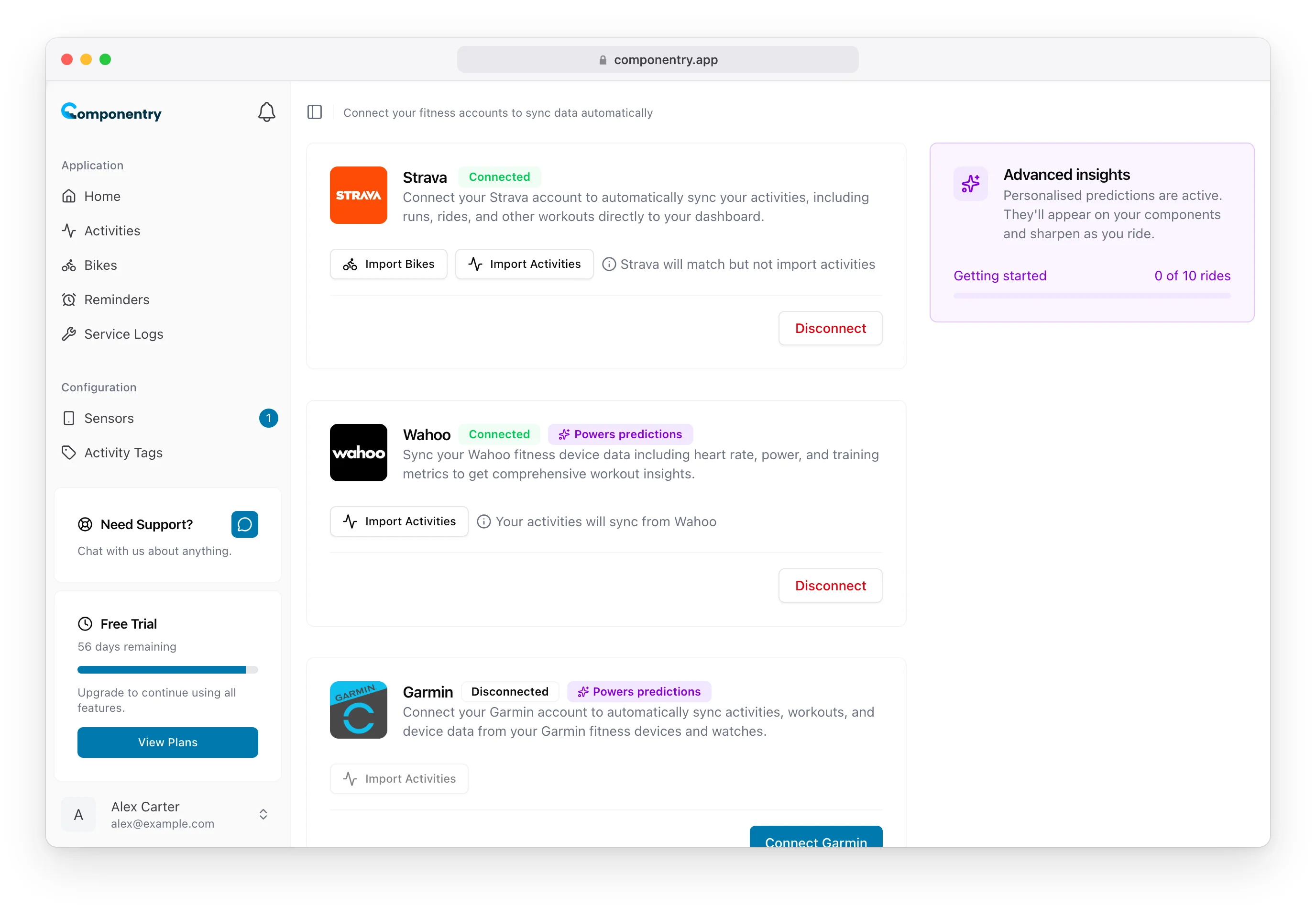
Connect a bike computer
Predictions need the detail in a bike computer's FIT file: power, cadence and second-by-second elevation. Strava's activity data doesn't include it, so Strava alone isn't enough.
- Open the Apps page.
- Connect Wahoo, Garmin or Hammerhead. Each of these carries a Powers predictions badge.
- Import past activities from that provider to build up your ride count faster.
You can also upload FIT files from your bike computer on the Activities page. See Activities.
Without a bike computer, everything else keeps working: distance, duration and time-based wear, reminders, service logs, chain power loss (at reduced accuracy) and Race-Day Readiness.
Ride count stages
Componentry counts every ride on your account that has a FIT file, from a connected bike computer or an upload. The count is shared across all your bikes.
| Rides with a FIT file | Stage | What you see |
|---|---|---|
| 0–9 | Getting started | Standard wear only. |
| 10–24 | Early estimate | Predictions appear on supported components, with an Early estimate badge on the prediction card. |
| 25–49 | Full predictions | The Early estimate badge goes and confidence rises. |
| 50+ | High confidence | The most confident predictions. |
Each stage raises the confidence shown at the bottom of the prediction card. Stages change automatically as rides arrive. There's nothing to switch on.
Track your progress
The Advanced insights card shows your stage and how many rides you have towards the next one, for example 4 of 10 rides. The count is the same everywhere it appears, including on each bike page, because it covers all your bikes. Once a bike computer is connected but before your first 10 rides, the card says predictions start after 10 rides with ride data.
- Apps page: the card sits beside your connections.
- Dashboard: the card appears once you've connected Strava or a bike computer. Click it for an explanation of how predictions work, or dismiss it with the cross. It retires itself once you reach High confidence.
- Riding History: on the Bikes page and each bike page, a small Advanced insights progress bar links to the Apps page.
If only Strava is connected, the card reads Unlock advanced insights with a Connect a bike computer button.
Multiple bikes
The ride count is for your whole account, but each bike's predictions are worked out from the rides on that bike. For them to be right, rides need to land on the correct bike and profile. Pairing your sensors helps. See Sensors and Profiles.
Troubleshooting
My ride count isn't going up. Check the provider still shows as connected on the Apps page and that the ride has synced to Componentry. Rides that reach Componentry only through Strava don't count, even if they were recorded on a bike computer. Connect the bike computer's own account as well.
I have enough rides but a component has no prediction. Check the component type is supported. Its detail panel says so if it isn't. See What predictions cover.
Predictions look off for one bike. Make sure rides are assigned to that bike and not another. Predictions follow the rides on each bike.