• Features
  • Plans
  • Blog
  • FAQs
  • Help
Sign InSign Up
  • Getting started with Componentry
  • Activity Tags
    • Creating Activity Tags
    • Editing and Deleting Activity Tags
    • Hiding Activity Tags
  • Devices
    • Linking a Device to Gear
    • Linking a Device to a Strava Bike
  • Reminders
    • Creating Reminders
    • Time & Duration Reminders
    • Editing & Deleting Reminders
    • Assigning Reminders to Gear & Components
    • Completing Reminders
  • Profiles
    • Creating and Managing Profiles
    • Assigning Components to Profiles
    • Profiles and Activities
  • Service Logs
    • Creating a Service Log for Gear
    • Retiring and Adding Components with Service Log Links
    • Creating and Emailing Service Reports
  • Notifications
    • Notification Types
    • Managing Notification Preferences
    • Troubleshooting Notifications
  • Bike Fit Measurements
    • Using Bike Fit Measurements
  • Predictions
    • Unlocking Predictions
    • Personalised Wear Predictions
    • Wear Factors
    • Race-Day Readiness

Personalised Wear Predictions

Read and interpret your personalised wear estimates on the component detail view in Componentry.

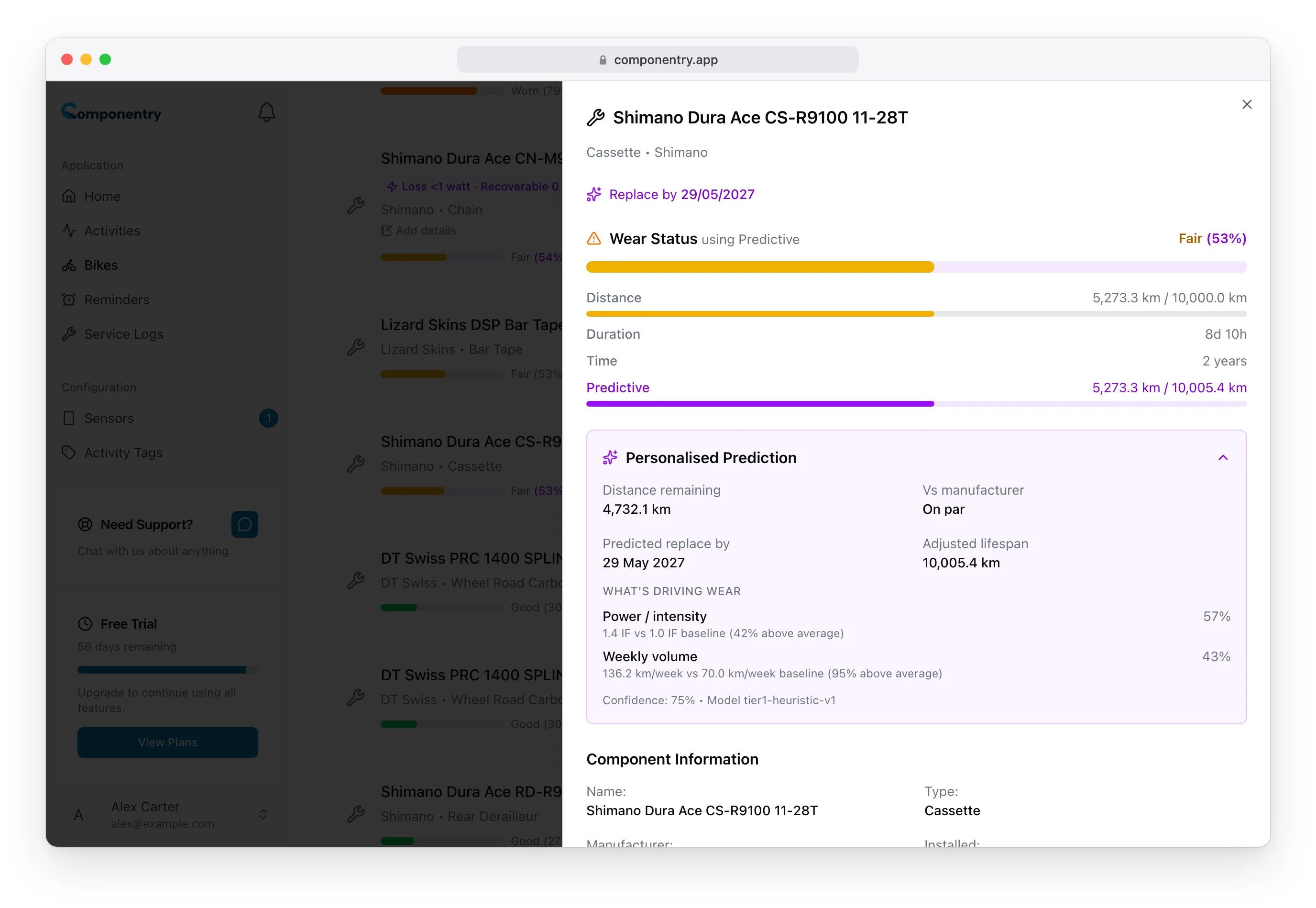
Once personalised predictions are unlocked (see Unlocking Predictions), every eligible component picks up a Personalised Prediction section on its detail view. This page walks through what each number means and how to act on it.

Where to Find It

Open any bike, tap a component, and scroll to the Personalised Prediction section. It sits alongside the existing wear bars — not instead of them.

[Screenshot placeholder: Component detail sheet with the Personalised Prediction section expanded]

What Each Number Means

Distance Remaining

An estimate of how much further the component is expected to last on this bike, based on how you've been riding. This is the headline number — the one you'll check most often.

Predicted Replace By

A projected date, based on your recent weekly riding volume. If you're riding more than usual, the date shifts in; if you're taking a break, it shifts out. The date refreshes automatically each time a new ride syncs.

Adjusted Lifespan

The total distance the component is likely to last for you, compared to the manufacturer's stated lifespan. If the manufacturer says 5,000 km but your riding style means the part will go for closer to 3,500 km, you'll see both numbers so you can compare.

Vs Manufacturer

A percentage delta that makes the comparison more immediate. A value like −30% means you're likely to wear this part out 30% faster than the manufacturer spec suggests. A positive value means you're on track to get more life out of it than the spec implies.

Confidence

A score from 0–100% representing how much Componentry trusts the estimate for you specifically. Confidence rises as more rides accumulate and as more of your riding history covers the component in question. Early estimates usually sit in the lower range.

[Screenshot placeholder: The Personalised Prediction panel with distance remaining, predicted replace by, adjusted lifespan, and confidence labels]

Early Estimate vs Full Predictions

Between 10 and 25 FIT-file rides, predictions carry an Early estimate badge. Treat these as directional — good enough to spot a component that's wearing fast, not precise enough to plan around to the day. Once you cross 25 rides, the badge drops off and the numbers can be used for concrete planning.

Beyond 50 rides, predictions are labelled with high confidence and the caveat framing is removed entirely.

When Predictions Refresh

Predictions recalculate automatically when:

  • A new ride syncs from any connected provider
  • You log a service event or mark a component as replaced
  • A component is moved between bikes
  • A component's manufacturer lifespan is updated

You don't need to refresh the page or trigger anything manually — next time you open the component, the updated numbers will be there.

How to Act on the Numbers

If You See a Shorter-Than-Manufacturer Estimate

A negative "Vs manufacturer" value means something about your riding is wearing the part faster than the baseline. Open the What's driving wear section (covered in Wear Factors) to see which factors are pushing the estimate. Often it's terrain, weather exposure, or power output — sometimes all three.

If You See a Longer-Than-Manufacturer Estimate

A positive value means you're on track to get more life out of the component than the spec. This is more common for riders on flat, dry routes at moderate intensity. Keep riding as you are and log the component when you eventually do replace it — that event helps the model further.

If the Predicted Date Jumps Around

Predicted dates are sensitive to your most recent weeks of riding. A big training block will pull the date in; a quiet few weeks will push it out. This is working as designed — the system is tracking your actual rate, not a lifetime average. Over time the date will stabilise as your riding pattern does.

[Screenshot placeholder: Adjusted lifespan bar shown alongside the manufacturer lifespan bar]

Logging Replacements Improves the Model

When you mark a component as replaced, you're telling Componentry the actual lifespan of the part that just came off. This is the single most valuable signal for tightening predictions — both for you and for riders with similar riding profiles. The more consistently you log replacements, the sharper every future estimate becomes.

Components Without Predictions

Some component types don't have personalised predictions today — typically parts where wear is cosmetic, time-dominated, or doesn't correlate cleanly with ride data. On those components you'll see a note explaining that predictions aren't available for this component type. Manufacturer wear tracking continues to work as normal.

The next section covers the "What's driving wear" breakdown, which explains why a component is wearing at its predicted rate.

Know your bike, down to the individual component. Unlock more from your bike to keep it running at peak performance.

© Copyright 2026 Componentry. All Rights Reserved.
Download on the App StoreGet it on Google Play
About
  • Features
  • Plans
  • FAQs
  • Blog
  • Contact
Product
  • Help
  • Changelog
Legal
  • Terms of Service
  • Acceptable Use Policy
  • Privacy Policy
  • Cookie Policy
Connect
  • @componentry.app
  • @componentry
  • @componentry
  • r/componentry
  • @componentry.app