Auto-matching Rides to Bikes
How Componentry picks the bike and profile for each new ride, and how to set it up so you never choose a bike by hand.
When a new ride arrives, Componentry picks the bike you rode and the profile it used, then adds wear to the right components. Set it up once and you don't have to choose a bike after each ride.
How the bike is chosen
Componentry works down this list and stops at the first match:
- Your sensors. A sensor on the ride that's paired with one of your bikes. For rides that come from Strava, the Strava bike on the ride, if it's linked to a sensor paired with one of your bikes. Heart rate monitors and trainers never decide the bike. If the ride's sensors are paired with more than one bike, the sensor most firmly fixed to the frame wins: an electronic groupset, then a power meter, then a speed or cadence sensor.
- Your indoor bike. An indoor or virtual ride that no sensor places goes to the bike with an Indoor profile, as long as only one of your bikes has one. The ride gets that Indoor profile. If several bikes have an Indoor profile, this step is skipped.
- Your default bike. Anything else goes to your default bike, if you've set one.
If none of these apply, the ride has no bike until you choose one on the Activities page.
A ride from a head unit whose file couldn't be downloaded is left without a bike rather than guessed. If the download failed for a passing reason, Componentry tries again on its own.
How the profile is chosen
On bikes with profiles, the ride then gets the first of these that applies:
- The profile pinned to a sensor on the chosen bike
- The bike's profile tagged with the ride's type (Indoor or Outdoor)
- The bike's default profile
- No profile
See Profiles and Activities for how each option affects wear.
Set it up
- Connect your apps. On the Apps page, connect the app for your head unit (Garmin, Wahoo or Hammerhead) so rides arrive with their sensors. Connect Strava too if you want your bike set on Strava.
- Pair one sensor per bike. On the Sensors page, pair a sensor that stays on each bike, such as a Di2 or AXS groupset or a fitted power meter.
- Set a default bike. Open the bike you ride most, click Settings, then Set as default bike. Rides nothing else can place go here.
- Tag your trainer bike (optional). If you ride one bike on an indoor trainer, add a profile with Default activity set to Indoor on that bike. Indoor rides recorded in a trainer app, with none of the bike's sensors, then land on it.
- Link Strava bikes (optional). Link each paired sensor to its Strava bike so Strava shows the right bike too.
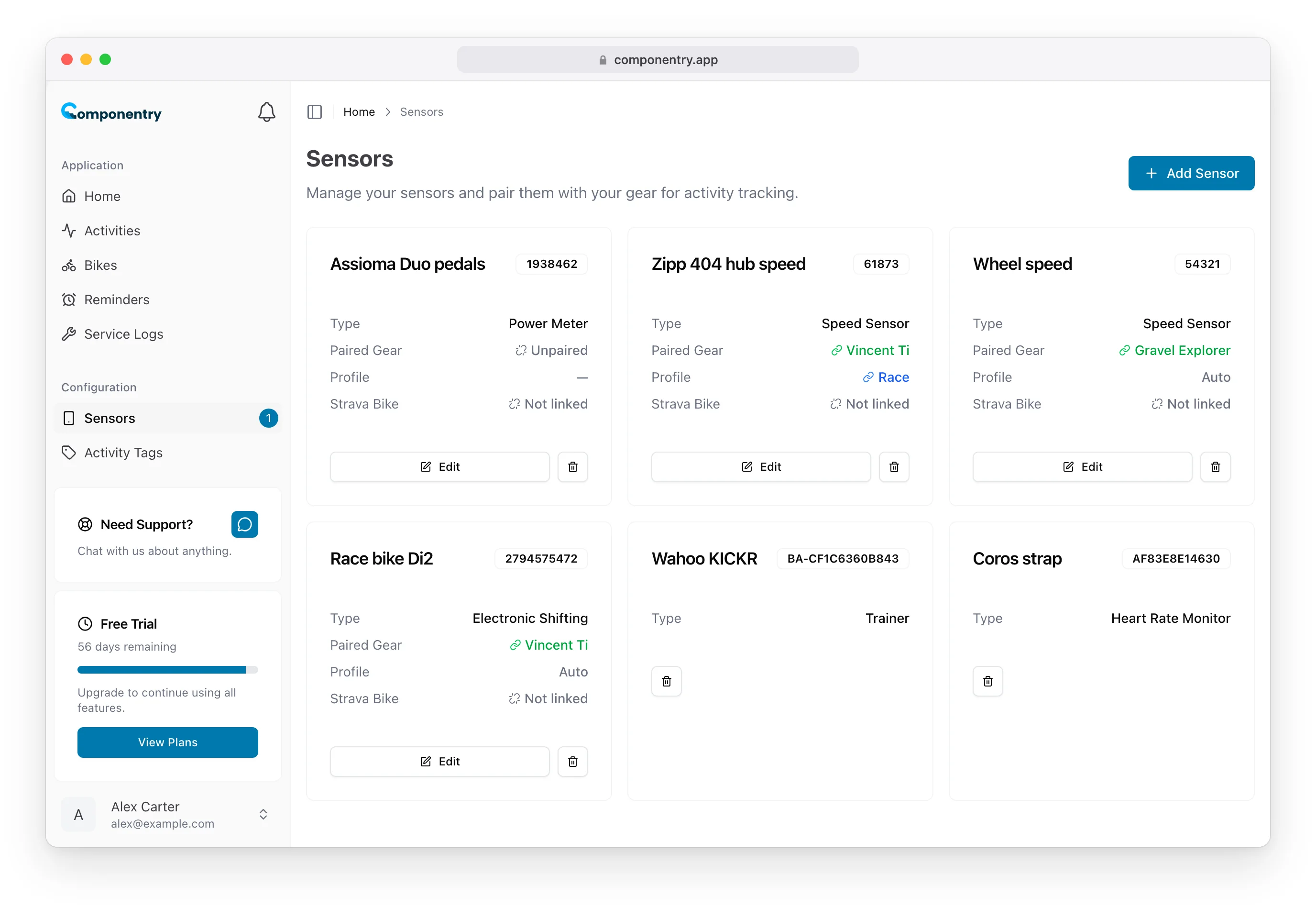
Check it's working
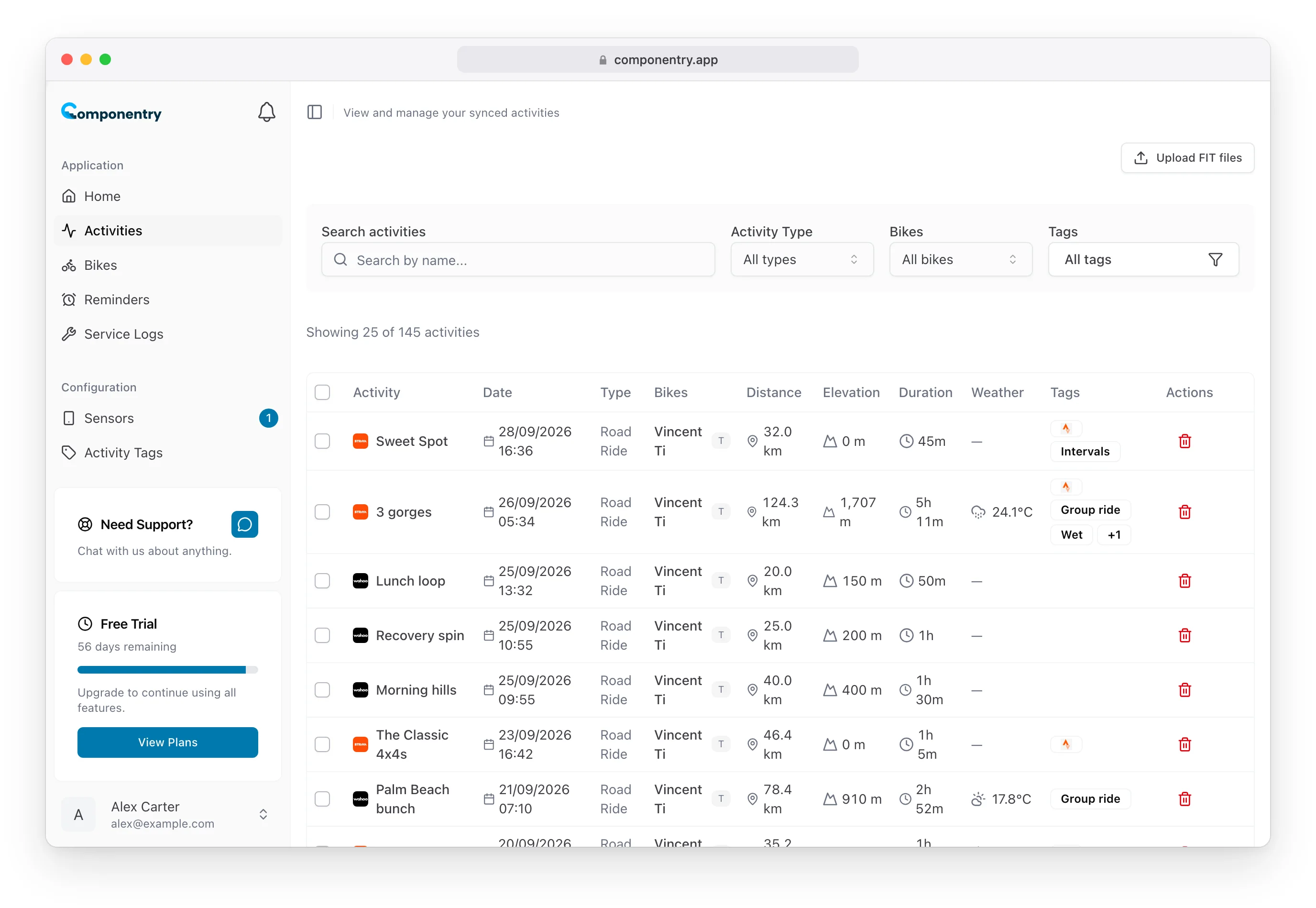
After your next ride, open Activities. The Bikes column shows the matched bike, with the first letter of the profile beside it. Open the ride to see or change the bike and profile.
Troubleshooting
A ride has no bike. None of its sensors are paired and you haven't set a default bike, or the ride's file couldn't be read. Choose the bike on the ride, or select several rides and use Assign Bike.
A ride went to the wrong bike. A sensor on that ride is paired with a different bike, often one that moved between bikes. When sensors from two bikes are on one ride, the frame-fixed one wins, so a groupset beats a wheel speed sensor. Fix the pairing on the Sensors page, then correct the ride. Pairing changes only apply to new rides.
An indoor ride didn't reach my trainer bike. Check only one bike has an Indoor profile, and that the ride is marked as indoor by the app that recorded it. A sensor paired with another bike takes priority.
Strava wasn't updated. See Setting your bike on Strava automatically.