Completing Reminders from Service Logs
Tick off all of a bike's maintenance reminders from a maintenance check or service log, and keep a record of which service completed them.
A service rarely covers just one thing. While the chain is off you also check the pads and top up the sealant. Every maintenance check and service log has a Reminders card for its bike, so you can tick off everything the session covered in one go and keep a record of it against that service.
What the Reminders card shows
- The bike's reminders: every reminder on the bike, including those on its components, most urgent first. Each row shows what it is attached to, its status (Overdue, Due Soon, Upcoming or Scheduled) and how close it is to due in days, distance, hours of riding or rides. Reminders already done for this cycle are marked Done this cycle, and paused ones are labelled. The badge at the top counts how many are due.
- Completed in this log: the reminders completed as part of this service.
Everything is offered, not just what is due, because a service often covers work early.
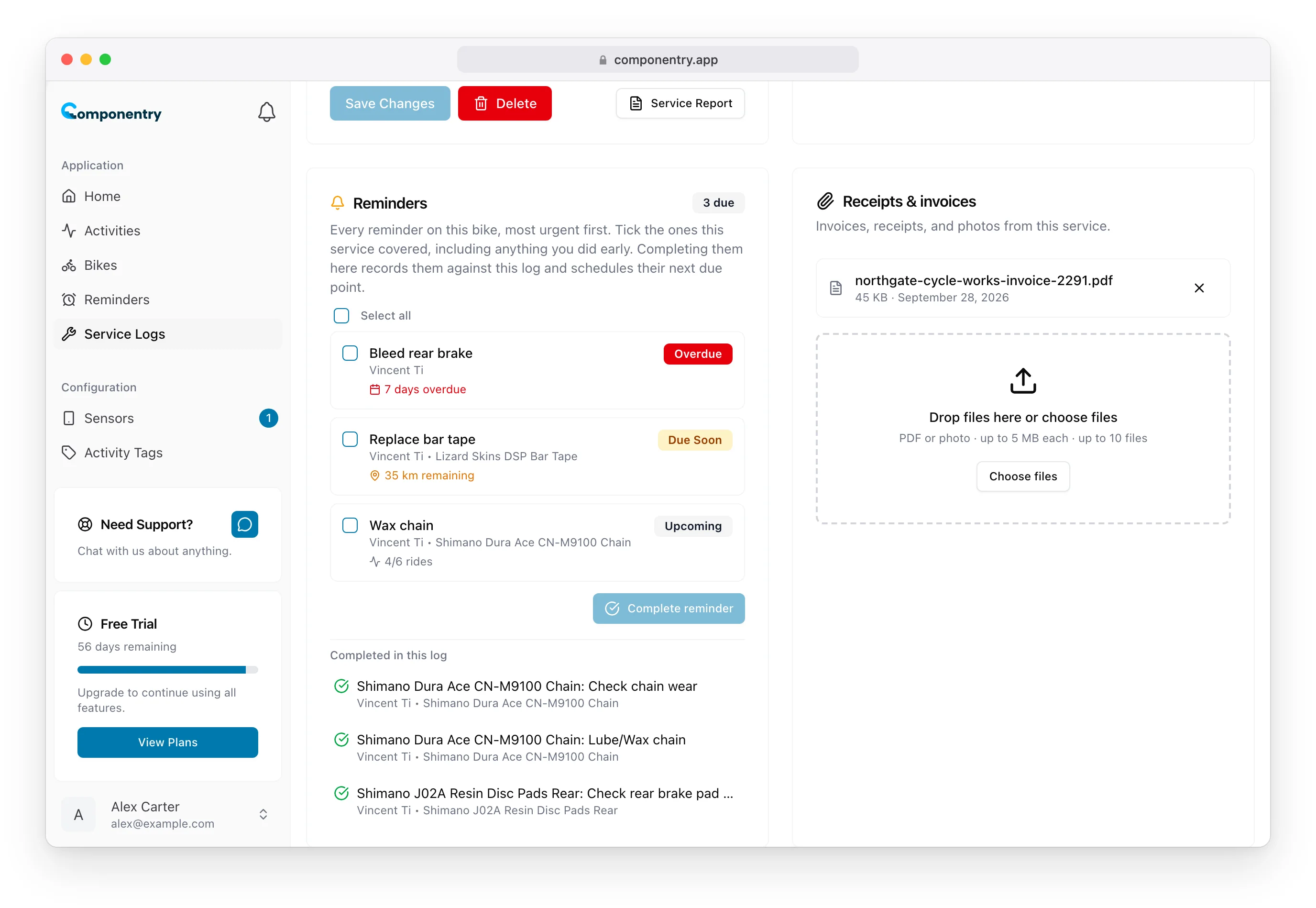
Complete reminders as part of a service
- Open the maintenance check or service log.
- In Reminders, tick the reminders the service covered. Use Select all if it covered everything on the bike.
- Choose Complete reminder (or Complete 3 reminders, and so on).
Each ticked reminder is completed straight away, scheduled for its next due point and moved to Completed in this log. Completing one early simply restarts its interval.
Completion works exactly as it does anywhere else: time-based reminders schedule from today, distance-based and duration-based reminders from the bike's or component's current distance and ride time, and ride-count reminders reset their count. On a back-dated maintenance check, the record keeps the check's date while the next due point is still calculated from today.
Start a service from a reminder
It also works the other way round. When you complete a reminder that belongs to a bike, from the dashboard, the Reminders page or the mobile app, Componentry offers to record the work as a Maintenance Check or Full Service Log. Either creates the record with that reminder already completed and opens it, so you can tick off anything else the session covered. See Completing Reminders.
A permanent record
Reminders completed through a service stay on that service's record, even if you later rename or delete the reminder. Over time this answers questions a reminder list cannot, such as when the chain was last waxed and which service did it.
Reminders on a part you retire are handled separately: they move to its replacement when the service is completed. See Retiring and Replacing Components.
The same Reminders card appears on maintenance checks and service logs in the mobile app.