• Plans
  • Blog
  • FAQs
  • Help
Sign InSign Up
  • Getting started with Componentry
  • Bikes
    • Adding a bike
    • Purchase and receipts
    • Distance ridden
    • Insurance
    • Bike settings
  • Components
    • Setting Up a Bike with a Template
    • Adding Components
    • Editing and Removing Components
    • Tire Pressure
    • Chains: Wax, Lube and Stretch
  • Activities
    • Connecting apps
    • Uploading FIT files
    • Editing activities
    • Pairing a ride with Strava
  • Sensors
    • Auto-matching Rides to Bikes
    • Pairing a Sensor with a Bike
    • Setting Your Bike on Strava Automatically
  • Profiles
    • Creating and Managing Profiles
    • Assigning Components to Profiles
    • Profiles and Activities
  • Reminders
    • Creating Reminders
    • Reminder schedules: time, distance and rides
    • Finding, Editing and Deleting Reminders
    • Reminders on bikes and components
    • Completing Reminders
  • Service Logs
    • Creating a Service Log
    • Maintenance Checks
    • Retiring and Replacing Components
    • Completing Reminders from Service Logs
    • Emailing a Service Report
  • Predictions
    • Unlocking Predictions
    • Personalised Wear Predictions
    • Wear Factors
    • Race-Day Readiness
    • Chain Power Loss
  • Bike Fit Measurements
    • Using Bike Fit Measurements
  • Activity Tags
    • Creating Activity Tags
    • Editing and Deleting Activity Tags
    • Hiding Activity Tags
  • Notifications
    • Notification Types
    • Managing Notification Preferences
    • Troubleshooting Notifications
  • AI Assistants
    • Connecting Claude
    • Privacy and Permissions
  • Account settings
    • Units and locale
    • Billing and free trial

Units and locale

Choose your language, timezone, number and date formats, and the units for distance, elevation, temperature and tyre pressure.

Two cards on the Profile page control how Componentry shows things to you: Locale and Units. Each has its own Update Profile button, so save one card before moving to the other.
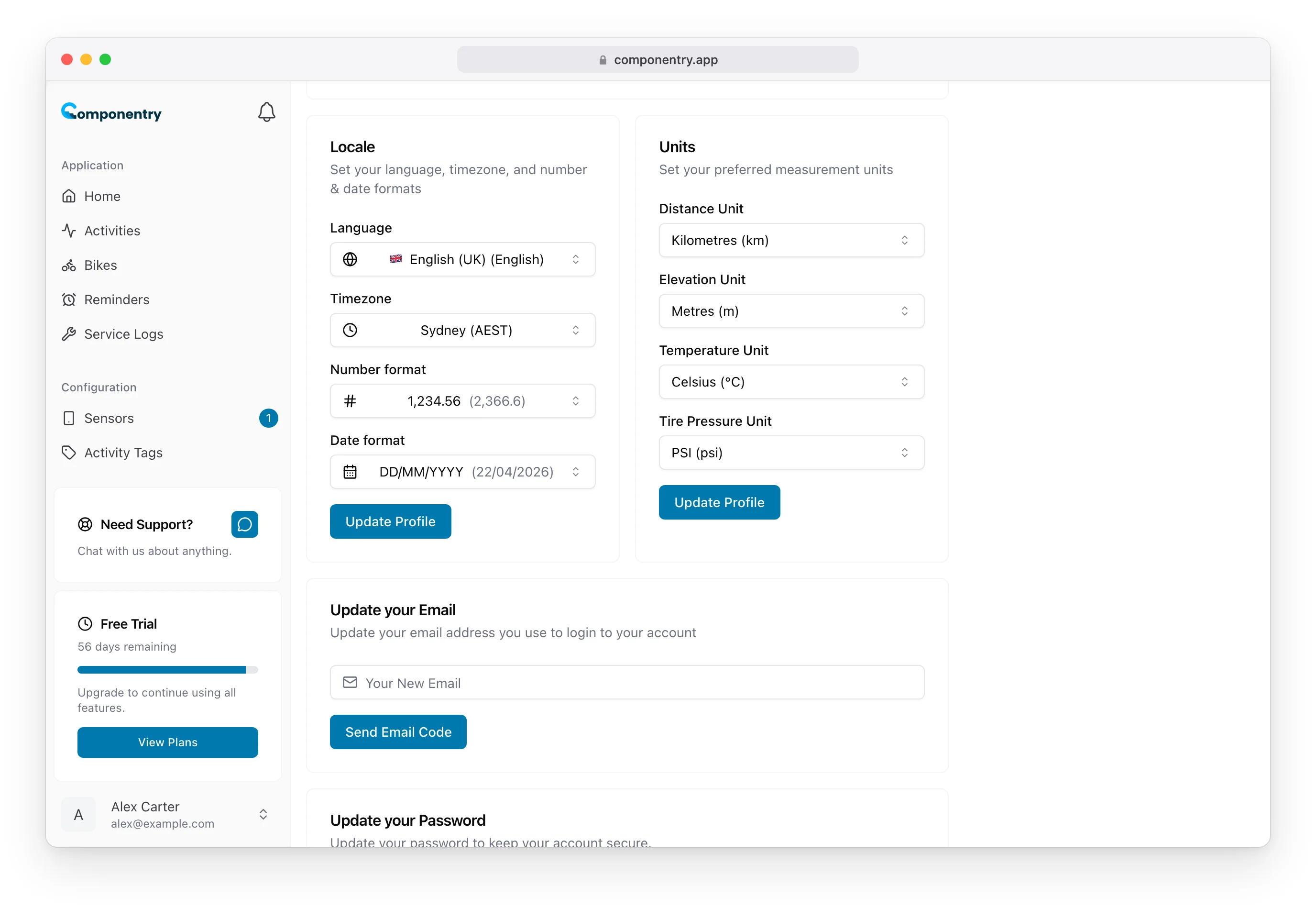
Locale card set to English (UK), Sydney timezone, 1,234.56 and DD/MM/YYYY, beside the Units card set to kilometres, metres, Celsius and PSI

Locale

SettingOptions
LanguageEnglish (UK), English (US), German, Spanish, French, Italian, Dutch, Polish, Portuguese
TimezoneYour local timezone
Number format1,234.56, 1.234,56 or 1234.56
Date formatDD/MM/YYYY, MM/DD/YYYY or YYYY-MM-DD

Each number and date format shows a sample next to it so you can see the effect before saving.

  • Timezone is set from your browser the first time you sign in. It decides the time of day reminders fall due, such as the 9:00 insurance renewal reminder, and which day your rides count towards.
  • Number format applies to every distance, elevation, temperature, price and premium.
  • Date format applies to ride dates, fitted dates, service history, reminders, purchase dates, insurance dates, predicted replacement dates and Race Day dates.

Until you choose a number or date format yourself, Componentry picks one to suit your language.

Units

SettingOptions
Distance UnitKilometres (km) or Miles (mi)
Elevation UnitMetres (m) or Feet (ft)
Temperature UnitCelsius (°C) or Fahrenheit (°F)
Tyre Pressure UnitPSI (psi), Kilopascals (kPa) or Bar (bar)

Changing the distance, elevation or temperature unit only changes how figures are shown. Your rides, wear and reminders are stored the same way whichever unit you pick, so you can switch back and forth freely. Where you type a distance, such as a reminder interval or a bike's distance before Componentry, you enter it in your chosen unit.

Tyre Pressure Unit is different: changing it changes the label only, and saved pressures aren't converted. A tyre saved at 72 psi shows 72 bar after you switch to bar, so re-enter your pressures after changing it. See Tire pressure.

These settings are saved to your account, so the mobile app uses the same ones, and you can change them there too.

Know your bike, down to the individual component. Unlock more from your bike to keep it running at peak performance.

© Copyright 2026 Componentry. All Rights Reserved.
Download on the App StoreGet it on Google Play
About
  • Features
  • Predictions
  • Integrations
  • Service history
  • Reminders
  • Bikes
  • AI assistants
  • Plans
  • FAQs
  • Blog
  • Contact
Product
  • Help
  • Changelog
Resources
  • Tire pressure calculator
Compare
  • All comparisons
  • vs ProBikeGarage
  • vs Strava
  • vs Geer
  • vs WatchMy.Bike
  • vs Velo Buddy
  • vs MainTrack
  • vs Bikerly
Legal
  • Terms of Service
  • Acceptable Use Policy
  • Privacy Policy
  • Cookie Policy
Connect
  • @componentry.app
  • @componentry
  • @componentry
  • r/componentry
  • @componentry.app