• Plans
  • Blog
  • FAQs
  • Help
Sign InSign Up
  • Getting started with Componentry
  • Bikes
    • Adding a bike
    • Purchase and receipts
    • Distance ridden
    • Insurance
    • Bike settings
  • Components
    • Setting Up a Bike with a Template
    • Adding Components
    • Editing and Removing Components
    • Tire Pressure
    • Chains: Wax, Lube and Stretch
  • Activities
    • Connecting apps
    • Uploading FIT files
    • Editing activities
    • Pairing a ride with Strava
  • Sensors
    • Auto-matching Rides to Bikes
    • Pairing a Sensor with a Bike
    • Setting Your Bike on Strava Automatically
  • Profiles
    • Creating and Managing Profiles
    • Assigning Components to Profiles
    • Profiles and Activities
  • Reminders
    • Creating Reminders
    • Reminder schedules: time, distance and rides
    • Finding, Editing and Deleting Reminders
    • Reminders on bikes and components
    • Completing Reminders
  • Service Logs
    • Creating a Service Log
    • Maintenance Checks
    • Retiring and Replacing Components
    • Completing Reminders from Service Logs
    • Emailing a Service Report
  • Predictions
    • Unlocking Predictions
    • Personalised Wear Predictions
    • Wear Factors
    • Race-Day Readiness
    • Chain Power Loss
  • Bike Fit Measurements
    • Using Bike Fit Measurements
  • Activity Tags
    • Creating Activity Tags
    • Editing and Deleting Activity Tags
    • Hiding Activity Tags
  • Notifications
    • Notification Types
    • Managing Notification Preferences
    • Troubleshooting Notifications
  • AI Assistants
    • Connecting Claude
    • Privacy and Permissions
  • Account settings
    • Units and locale
    • Billing and free trial

Uploading FIT files

Backfill years of riding by uploading FIT files from Garmin, Wahoo, Hammerhead or Coros in bulk.

Connected apps only let Componentry import a limited stretch of history. To bring in older rides, upload the FIT files your bike computer recorded. Uploaded rides are handled exactly like synced ones: matched to a bike, added to component wear and, when the file has GPS, given weather.
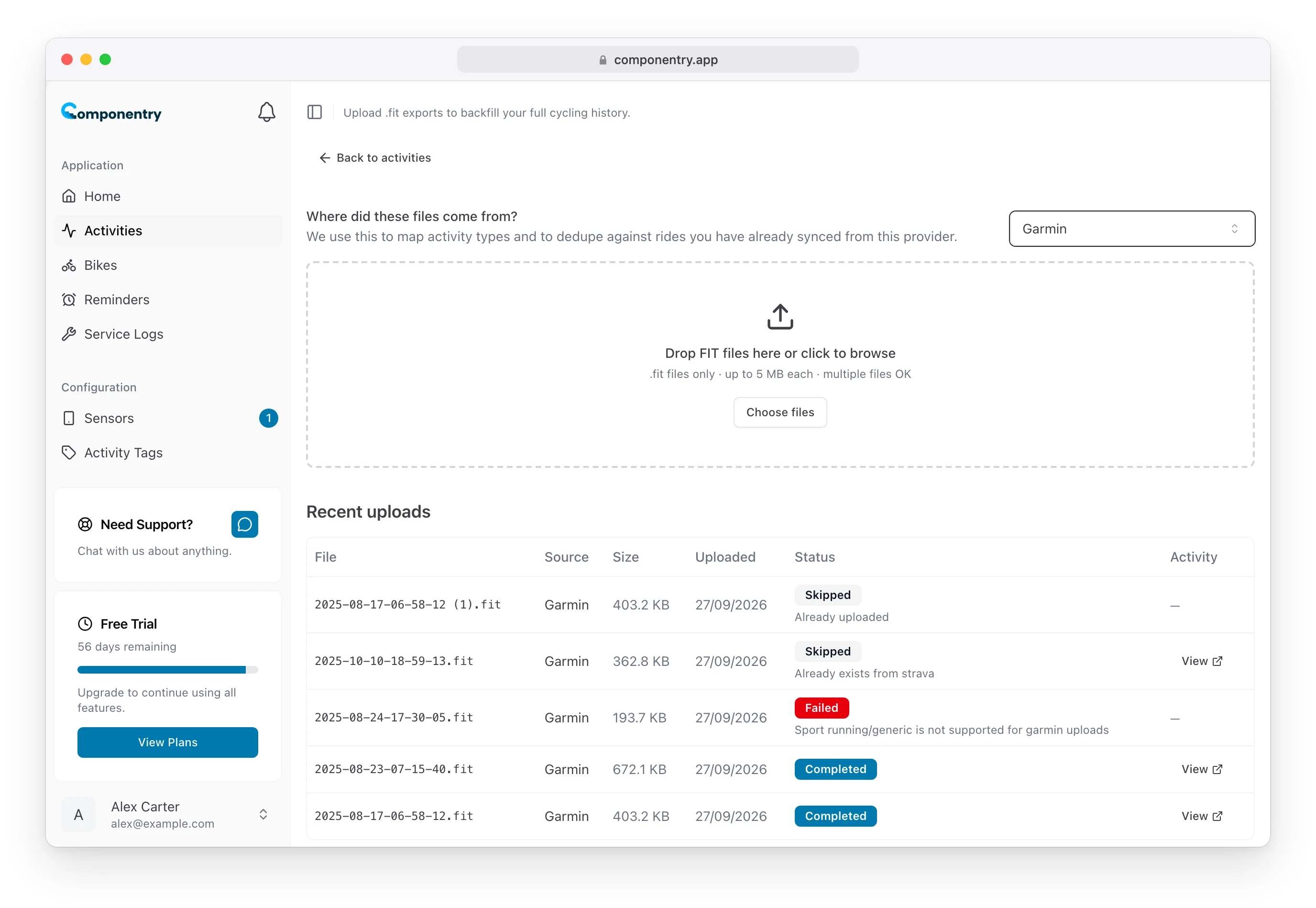
Import FIT files page with Garmin chosen as the source and a list of recent uploads

Upload files

  1. On the Activities page, select Upload FIT files (top right).
  2. Under Where did these files come from?, pick Garmin, Wahoo, Hammerhead or Coros. Componentry uses this to read the ride type correctly and to spot rides you've already synced from that provider.
  3. Drag your files onto the drop area, or select Choose files. You can add as many as you like at once. Each file must be a .fit file of up to 5 MB.
  4. Follow each file under Recent uploads. The list refreshes itself while files are in progress.

Select View on a finished upload to open that ride's details on the Activities page.

Upload statuses

  • Pending, Queued or Processing: waiting or being read.
  • Completed: the ride has been added to your activities.
  • Skipped: the ride is already in Componentry. The note says why: Already uploaded for a file you've uploaded before, or Already exists from a provider when that ride has already synced (for example from Strava). Nothing is added twice.
  • Failed: the file couldn't be used. The most common reason is a non-cycling activity, such as a run, which Componentry doesn't import.

FIT uploads are on the web app only. Rides you upload appear in the mobile app as normal.

Know your bike, down to the individual component. Unlock more from your bike to keep it running at peak performance.

© Copyright 2026 Componentry. All Rights Reserved.
Download on the App StoreGet it on Google Play
About
  • Features
  • Predictions
  • Integrations
  • Service history
  • Reminders
  • Bikes
  • AI assistants
  • Plans
  • FAQs
  • Blog
  • Contact
Product
  • Help
  • Changelog
Resources
  • Tire pressure calculator
Compare
  • All comparisons
  • vs ProBikeGarage
  • vs Strava
  • vs Geer
  • vs WatchMy.Bike
  • vs Velo Buddy
  • vs MainTrack
  • vs Bikerly
Legal
  • Terms of Service
  • Acceptable Use Policy
  • Privacy Policy
  • Cookie Policy
Connect
  • @componentry.app
  • @componentry
  • @componentry
  • r/componentry
  • @componentry.app