• Plans
  • Blog
  • FAQs
  • Help
Sign InSign Up
  • Getting started with Componentry
  • Bikes
    • Adding a bike
    • Purchase and receipts
    • Distance ridden
    • Insurance
    • Bike settings
  • Components
    • Setting Up a Bike with a Template
    • Adding Components
    • Editing and Removing Components
    • Tire Pressure
    • Chains: Wax, Lube and Stretch
  • Activities
    • Connecting apps
    • Uploading FIT files
    • Editing activities
    • Pairing a ride with Strava
  • Sensors
    • Auto-matching Rides to Bikes
    • Pairing a Sensor with a Bike
    • Setting Your Bike on Strava Automatically
  • Profiles
    • Creating and Managing Profiles
    • Assigning Components to Profiles
    • Profiles and Activities
  • Reminders
    • Creating Reminders
    • Reminder schedules: time, distance and rides
    • Finding, Editing and Deleting Reminders
    • Reminders on bikes and components
    • Completing Reminders
  • Service Logs
    • Creating a Service Log
    • Maintenance Checks
    • Retiring and Replacing Components
    • Completing Reminders from Service Logs
    • Emailing a Service Report
  • Predictions
    • Unlocking Predictions
    • Personalised Wear Predictions
    • Wear Factors
    • Race-Day Readiness
    • Chain Power Loss
  • Bike Fit Measurements
    • Using Bike Fit Measurements
  • Activity Tags
    • Creating Activity Tags
    • Editing and Deleting Activity Tags
    • Hiding Activity Tags
  • Notifications
    • Notification Types
    • Managing Notification Preferences
    • Troubleshooting Notifications
  • AI Assistants
    • Connecting Claude
    • Privacy and Permissions
  • Account settings
    • Units and locale
    • Billing and free trial

Purchase and receipts

Record when you bought a bike and what you paid, and keep the receipt with the bike for warranty, insurance claims and resale.

Each bike can keep its purchase date, the price you paid and the receipts. It's the record you reach for when you make an insurance claim, ask about a warranty or sell the bike.

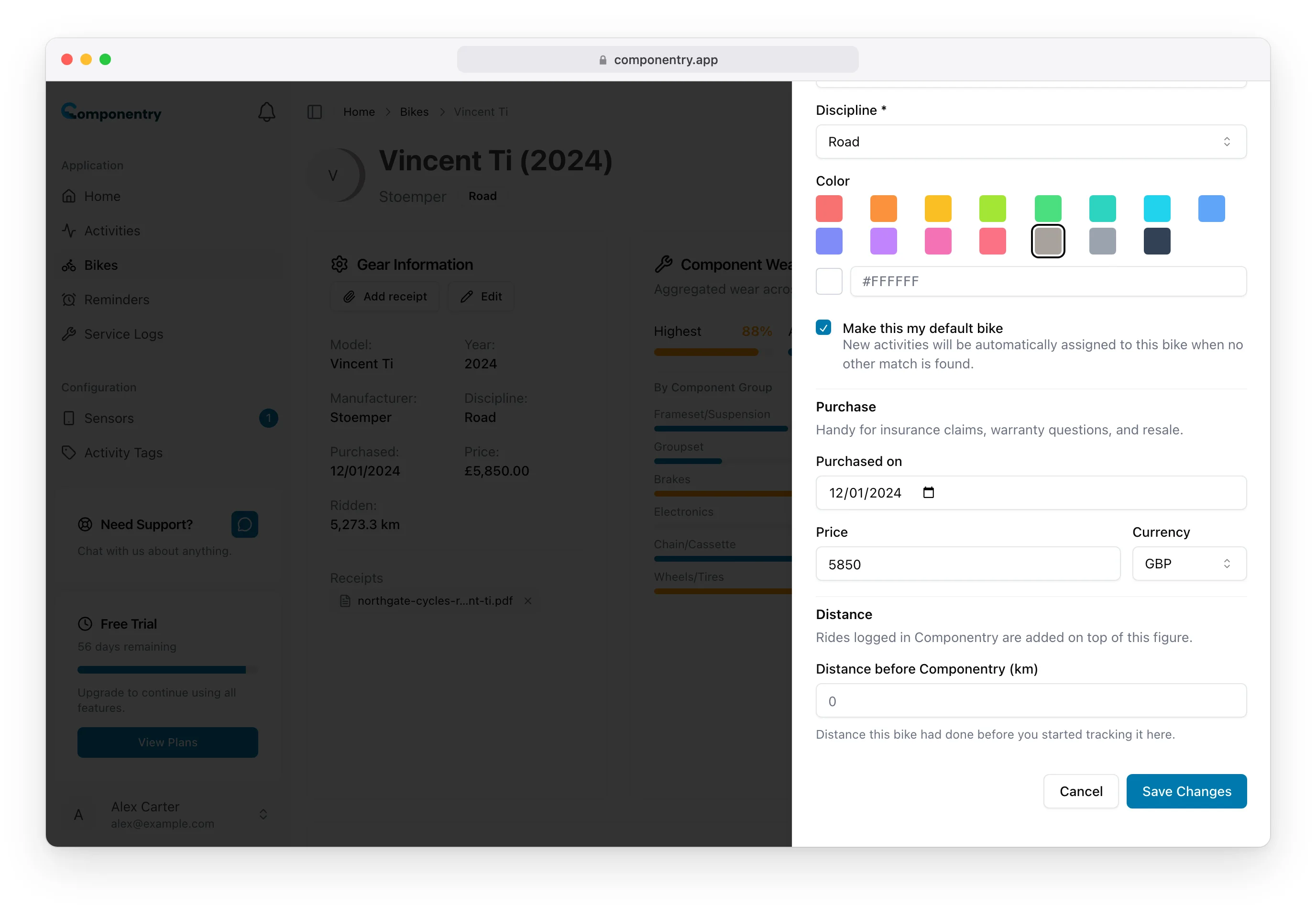
Record the purchase date and price

  1. Open the bike and choose Edit in the Bike Information card.
  2. Scroll to Purchase.
  3. Enter the Purchased on date and the Price, and choose the Currency you paid in.
  4. Choose Save changes.

Edit sheet showing the Purchase section with a purchase date of 12/01/2024 and a price of 5850 GBP

The purchase date can't be in the future. The currency starts as the one for your language and region, and you can pick any other. The date and price then show in the Bike Information card as Purchased and Price, in your chosen date and number format.

Add a receipt

  1. Open the bike.
  2. Choose Add receipt in the Bike Information card, or drag a file onto the button.
  3. Pick the file.

Receipts appear under Receipts at the bottom of the card.

File typesPDF, JPEG, PNG or WebP
SizeUp to 5 MB per file
How manyUp to 10 receipts per bike

A file that's too large, the wrong type or over the limit is refused by name, with the reason, before anything is uploaded. Files are checked for what they really contain, not just their name.

Open or remove a receipt

  • Choose a receipt to open it in a new tab.
  • Choose the × beside it to remove it. You're asked to confirm, and the file is deleted for good.

Receipts are private to your account. They're deleted when you remove the bike.

Related

  • Insurance keeps the policy and its documents in their own card.
  • Service logs have their own Receipts & invoices card for workshop invoices. See Service Logs.
  • The Distance section of the same edit sheet sets how far the bike had gone before Componentry. See Distance ridden.

You can record the purchase and add receipts from a bike's Details in the mobile app too.

Know your bike, down to the individual component. Unlock more from your bike to keep it running at peak performance.

© Copyright 2026 Componentry. All Rights Reserved.
Download on the App StoreGet it on Google Play
About
  • Features
  • Predictions
  • Integrations
  • Service history
  • Reminders
  • Bikes
  • AI assistants
  • Plans
  • FAQs
  • Blog
  • Contact
Product
  • Help
  • Changelog
Resources
  • Tire pressure calculator
Compare
  • All comparisons
  • vs ProBikeGarage
  • vs Strava
  • vs Geer
  • vs WatchMy.Bike
  • vs Velo Buddy
  • vs MainTrack
  • vs Bikerly
Legal
  • Terms of Service
  • Acceptable Use Policy
  • Privacy Policy
  • Cookie Policy
Connect
  • @componentry.app
  • @componentry
  • @componentry
  • r/componentry
  • @componentry.app