• Plans
  • Blog
  • FAQs
  • Help
Sign InSign Up
  • Getting started with Componentry
  • Bikes
    • Adding a bike
    • Purchase and receipts
    • Distance ridden
    • Insurance
    • Bike settings
  • Components
    • Setting Up a Bike with a Template
    • Adding Components
    • Editing and Removing Components
    • Tire Pressure
    • Chains: Wax, Lube and Stretch
  • Activities
    • Connecting apps
    • Uploading FIT files
    • Editing activities
    • Pairing a ride with Strava
  • Sensors
    • Auto-matching Rides to Bikes
    • Pairing a Sensor with a Bike
    • Setting Your Bike on Strava Automatically
  • Profiles
    • Creating and Managing Profiles
    • Assigning Components to Profiles
    • Profiles and Activities
  • Reminders
    • Creating Reminders
    • Reminder schedules: time, distance and rides
    • Finding, Editing and Deleting Reminders
    • Reminders on bikes and components
    • Completing Reminders
  • Service Logs
    • Creating a Service Log
    • Maintenance Checks
    • Retiring and Replacing Components
    • Completing Reminders from Service Logs
    • Emailing a Service Report
  • Predictions
    • Unlocking Predictions
    • Personalised Wear Predictions
    • Wear Factors
    • Race-Day Readiness
    • Chain Power Loss
  • Bike Fit Measurements
    • Using Bike Fit Measurements
  • Activity Tags
    • Creating Activity Tags
    • Editing and Deleting Activity Tags
    • Hiding Activity Tags
  • Notifications
    • Notification Types
    • Managing Notification Preferences
    • Troubleshooting Notifications
  • AI Assistants
    • Connecting Claude
    • Privacy and Permissions
  • Account settings
    • Units and locale
    • Billing and free trial

Maintenance Checks

Record a quick inspection of a bike, with brake, tyre and chain readings, and upgrade it to a full service log when the job grows.

Not every trip to the workstand is a full service. A Maintenance Check is for looking the bike over and writing down what you found: pad thickness, tyre pressure, chain stretch, whether the chain is waxed. Nothing is retired or replaced, so it takes a minute to record.

Record a check

  1. Open Service Logs and choose Add Service Log.
  2. Leave Type on Maintenance Check (the default) and pick the bike under Select Bike.
  3. Choose Start Maintenance. The check opens straight away.
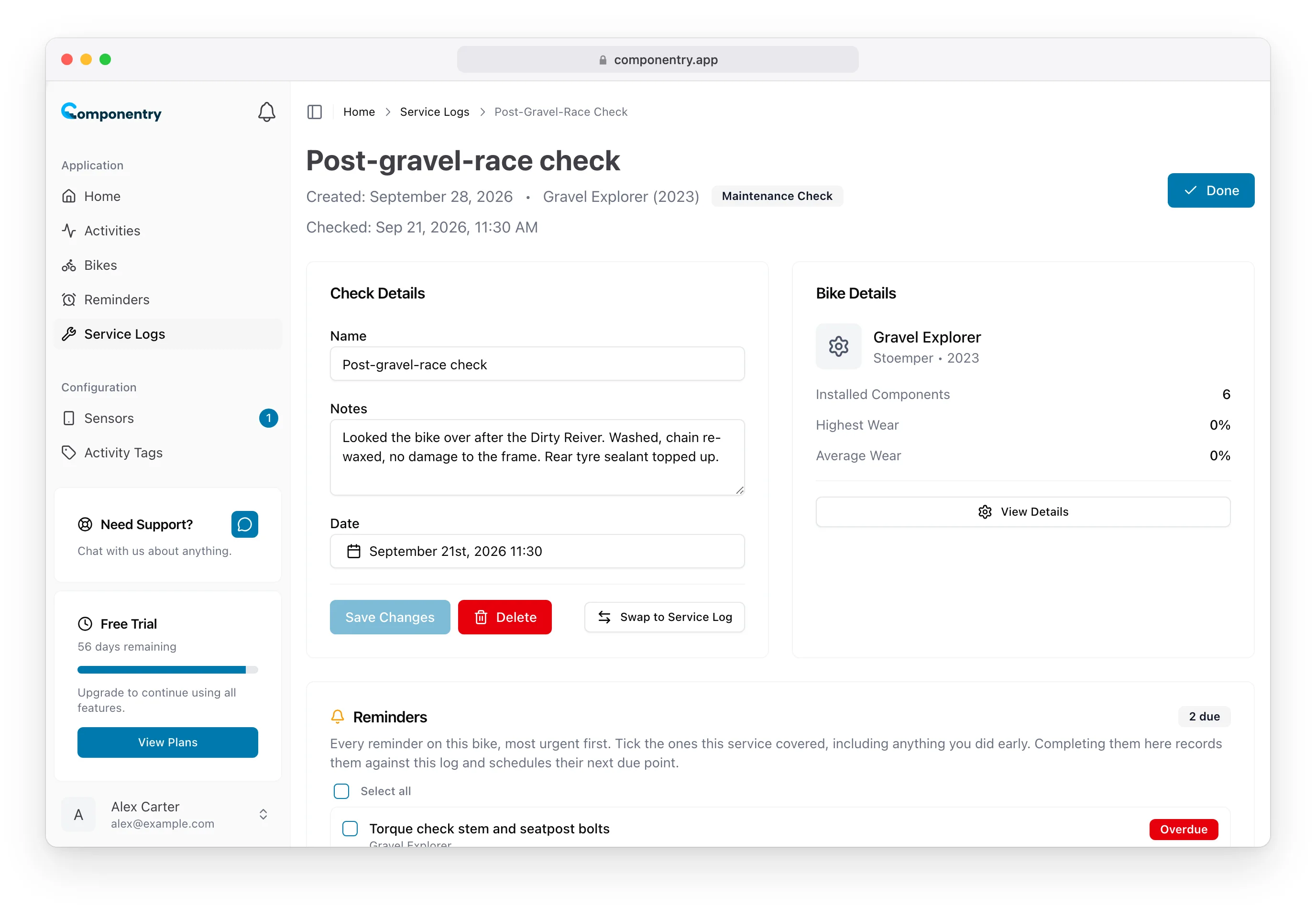
  4. In Check Details, give it a Name (new checks are called "Maintenance Check"), add Notes on overall condition, and set the Date. The date defaults to now and can be back-dated.
  5. Choose Save Changes.

A maintenance check on Gravel Explorer with its name, notes and date, and the bike's reminders below

A check is always recorded as done, so it has no status, crash flag or Completed By. In the Service Logs list it carries a Maintenance Check badge.

Record readings on components

Every installed component is listed under Installed Components. Choose Add service note on a component to record a note and its measurements:

  • Chain: Chain stretch as a whole number from your checker (0.30 is entered as 30) and Waxed.
  • Brake pads: Pad remaining.
  • Brake rotors: Rotor remaining.
  • Tires: Pressure.

Readings appear on each component's card in the check, so from one check to the next you can see how fast pads or a chain are wearing.
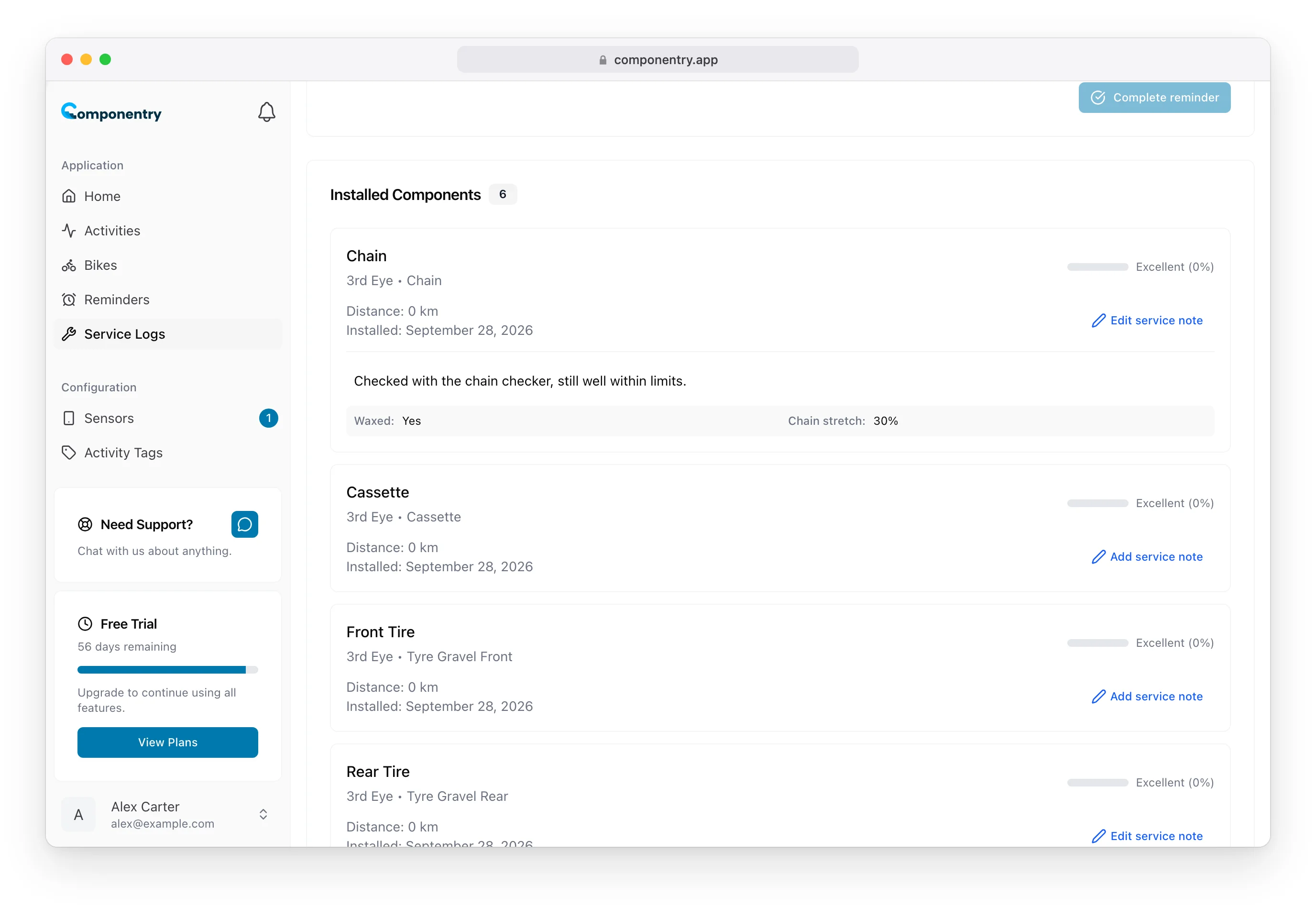
Installed Components on a maintenance check, with the chain showing a note, Waxed: Yes and Chain stretch: 30%

A check also lists the bike's reminders, so you can tick off anything the inspection covered. On a back-dated check, the reminder is recorded against the check's date. See Completing Reminders from Service Logs.

A check has a Receipts & invoices card too, for a shop receipt or a photo of what you found. It works the same way as on a full service; see Attach receipts and invoices.

Turn a check into a full service

If the check turns up work, such as a chain past its limit, upgrade it instead of starting a new record:

  1. Open the check and choose Swap to Service Log.
  2. Confirm with Swap to Service Log.

Your date, notes and component notes carry across. The upgraded log starts as Completed, and the check's date becomes its Completed Date & Time. It gains everything a full service log has: status, crash flag, Completed By, retiring and replacing components and service reports. Any receipts already attached stay with it.
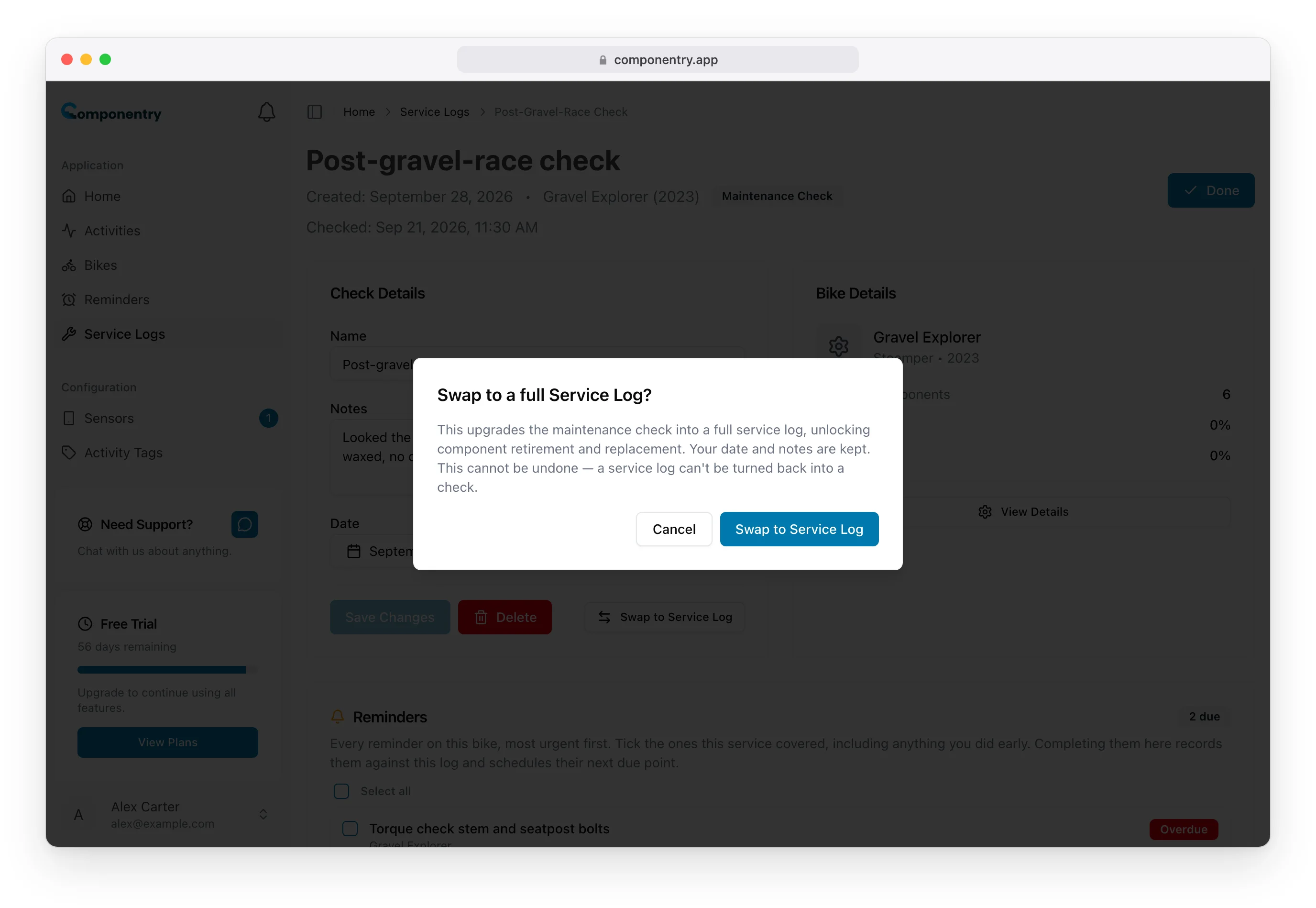
Swap to a full Service Log confirmation, warning that the change cannot be undone

The swap is one-way. A service log cannot be turned back into a check.

Maintenance checks, including the swap to a full service, are also available in the mobile app.

Know your bike, down to the individual component. Unlock more from your bike to keep it running at peak performance.

© Copyright 2026 Componentry. All Rights Reserved.
Download on the App StoreGet it on Google Play
About
  • Features
  • Predictions
  • Integrations
  • Service history
  • Reminders
  • Bikes
  • AI assistants
  • Plans
  • FAQs
  • Blog
  • Contact
Product
  • Help
  • Changelog
Resources
  • Tire pressure calculator
Compare
  • All comparisons
  • vs ProBikeGarage
  • vs Strava
  • vs Geer
  • vs WatchMy.Bike
  • vs Velo Buddy
  • vs MainTrack
  • vs Bikerly
Legal
  • Terms of Service
  • Acceptable Use Policy
  • Privacy Policy
  • Cookie Policy
Connect
  • @componentry.app
  • @componentry
  • @componentry
  • r/componentry
  • @componentry.app